Showing posts with label Tutorial. Show all posts
Tuesday, November 08, 2011

16 Best Free Blogger Templates Featuring Amazing jQuery Featured Slideshow

One of the popular features of Blogger Blogspot Templates is the Featured Post Slider or Slideshow Carousal.Not too long ago a very plain Image Slider was the best you could hope for and you were lucky to even get that.However now with so many awesome Free Blogger Templates and Designers creating templates and converting Css and Wordpress Themes to Blogger the options are fantastic.We constantly see templates of premium quality with stunning Image Sliders available for free download.In this post i will list 16 of the Best Blogger Templates With Featured Post Sliders, Image Sideshows and Picture Carousals.All the Sliders are created with jQuery which allows some cool features such as the transitions  (The effect between each slide).

So in no particular order here is the list !
Sixteen Free Blogger Templates With Fitted Featured Sliders

-Click On The Screenshot Of Each Template For The Demo and Download Details. 

Namisan - Stunning Slider Blogger Template

Namisan has the latest jQuery Featured Slideshow from Cu3er with stunning transitions that completely slice up the images between slides.A well coded template packed with gadgets and features Namisan has a two column layout with right sidebar.

Namisan - Stunning Slider Blogger Template


Ocenolis Magazine - Advanced Blogger Template

A colorful Three Column Blogger template with Two right sidebars.The Featured Slider, Image Slideshow Displays the images in a stacked fashion which rotate on click.

Ocenolis Magazine - Advanced Blogger Template


Nyke - Magazine Blogger Template

The Featured Slider, Image Slideshow has a very unique rounded bottom and a number of coll transitions between images.The template has a two column layout with right sidebar.

Nyke - Advanced Magazine Blogger Template


Floor - jQuery Rich Blogger Template

This is a dark colored template with a right sidebar.This template has a featured Carousal section brilliantly built into the design.Using jQuery the slides, info and link approach from different directions.

Floor - jQuery Rich Blogger Template


Game Madness - Assassins Creed Blogger Template

The Featured Slider, Image Slideshow on the Game Madness template spans the full width of the blog with nice transitions from each corner.The template has lots of extra gadgets and a gaming theme.

Game Madness - Assassins Creed Blogger Template


MoonLight - Clean Magazine Blogger Template

The Featured Slider, Picture Slideshow on Moonlight has a more simple design but fits neatly above the posts with auto scroll and manual scroll options.The template has a minimalist design with two columns and a right sidebar.

MoonLight - Clean Magazine Blogger Template


Simplex Buzz - Full Background Slideshow

Simplex Buzz has a very unique Slideshow indeed as the blogs entire background is the slideshow !.Then template also has a secondary featured posts section and a two column design with right sidebar.

Simplex Buzz - Full Background Slideshow


Oracle - Advanced Magazine Blogger Template

Oracle has a beautifully fitted Featured Slider, Image Slideshow with the sides fading away.The slides auto scroll with a manual scroll option.The template also has a two column magazine design with a left sidebar.

Oracle - Advanced Magazine Blogger Template


Extreme - Portfolio Magazine Blogger Template

Extreme Portfolio has a full featured section below the header were users can scroll through featured posts.The template also has a second categories section and a two column layout with right sidebar.

Extreme - Portfolio Magazine Blogger Template


Superb - Advanced Blogger Template

Superb has a really amazing and unique Featured Slider, Image Slideshow.The slides are stacked and move across with the titles listed vertically on the side.Superb has lots of other great features and a two column layout with right sidebar.

Superb - AdVanced Blogger Template


Modern Photography - Abstract Style Template

Modern Photography is a specialist Blogger template with a cool large Featured Slideshow, Image Carousal.The slider has a continues scroll and manual scroll option.The layout is two column with a right sidebar.

Modern Photography - Abstract Style Template


Calenotis - Photographers Magazine Blogger Template

Calenotis has a beautiful full width Featured Slider Slideshow that has a 3D design.The slides are on auto scroll with a number of different transitions.The template also has a professional magazine design with a two column right sidebar layout.

Calenotis - Photographers Magazine Blogger Template


Magulesco -Featured Magazine Blogger Template

Magulesco has an extremely clean professional design.The Featured Slider Slideshow sits over the header and body with a wide crisp design.The slides have some neat transitions with description section on each.The template also has a two column magazine design with right sidebar.

Magulesco -Featured Magazine Blogger Template


Dimenzion - 3D Style Blogger Template

Dimenzion has a classic featured slider with the featured posts listed to the right of the slides for navigation.The templates design is bright and somewhat unique with a two column right sidebar layout.

Dimenzion - 3D Style Blogger Template


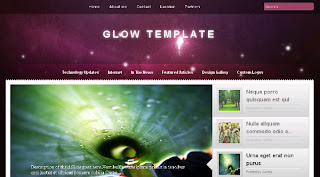
Glow - Free Premium Blogger Template

Glow has a beautifully constructed Featured Slider Slideshow.The slides are visible as thumbnails on the left of the full size slider.The template also has a glowing two column magazine design with right sidebar.

Glow - Free Premium Blogger Template


Mahasoli Tribune - Magazine Blogger Template

Mahasoli Tribune features a stacked style image slider, each image has a description and all images overlap to open out when clicked.The template has a magazine design with a two column right sidebar layout.

Mahasoli Tribune - Magazine Blogger Template


That's the list have you a favorite ?
Maybe you can see my template on there? Haha
How to add jQuery Image Hover Fade Effect
HTML Color generator
Source : http://www.spiceupyourblog.com/2011/06/blogger-templates-featured-slideshow.html

Read More "16 Best Free Blogger Templates Featuring Amazing jQuery Featured Slideshow"
Saturday, November 05, 2011

Google Adsense Not Appear On Your Blog?

Hei guys now i will share a tutorial to you.
Yesterday one of my visitor give a comment on this post. He said "I have approved at google adsense, but the ads not appear on my blog". Now i will to try resolve his problem

1. Check your approved email first

The email maybe like this if youre approved
2. After check your email, now you must login to google adsense
3. In Google adsense click  "My Ads" tab


4. After that click URL Channel on the My Ads tab

5. After that click "new url channel"


6. Fill it with your blog address

7. After succesfull to add a channel, now create your ads. Customize the ads, choose the size etc. And then click "Get Code". After you get the code like this. Copy the code to your blog. Layout-Add HTML/Javascript-And then Paste the Code. And save template.
8. Wait 10-15 to get your ads appear on your blog.
Place your ads in the right Place,  the most clicked adsense place
Read More "Google Adsense Not Appear On Your Blog?"
Friday, November 04, 2011

Vertical Slide Panel Info With jQuery

Look on the top side on my blog, you can see a box with "About Me" word. And maybe do you want to place a gadget like that on your blog? Follow this step.
1. Find ]]></b:skin> code on your own template (First you must click 'expand widget template' on the layout - edit HTML tab)
2. Copy this code above the ]]></b:skin>
.panel{position:fixed;top:20px;left:0;background:#000;-moz-border-radius-topright:10px;-webkit-border-top-right-radius:10px;-moz-border-radius-bottomright:10px;-webkit-border-bottom-right-radius:10px;border:1px solid #444;width:330px;height:auto;filter:alpha(opacity=85);-moz-opacity:0.85;opacity:0.85;display:none;padding:30px 30px 30px 100px}
.panel p{color:#ccc;margin:0 0 15px;padding:0}
.panel a,.panel a:visited{color:#9FC54E;text-decoration:none;border-bottom:1px solid #9FC54E;margin:0;padding:0}
.panel a:hover,.panel a:visited:hover{color:#fff;text-decoration:none;border-bottom:1px solid #fff;margin:0;padding:0}
a.trigger{position:fixed;text-decoration:none;top:50px;left:0;font-size:16px;letter-spacing:-1px;font-family:verdana, helvetica, arial, sans-serif;color:#fff;font-weight:700;background:#333 url(http://lh6.ggpht.com/_xcD4JK_dIjU/S4QDwX8gRPI/AAAAAAAAD2U/TdhwLYRRzzA/d/plus.png) 85% 55% no-repeat;border:1px solid #444;-moz-border-radius-topright:10px;-webkit-border-top-right-radius:10px;-moz-border-radius-bottomright:10px;-webkit-border-bottom-right-radius:10px;-moz-border-radius-bottomleft:0;-webkit-border-bottom-left-radius:0;display:block;padding:15px 40px 15px 15px}
a.trigger:hover{position:fixed;text-decoration:none;top:50px;left:0;font-size:16px;letter-spacing:-1px;font-family:verdana, helvetica, arial, sans-serif;color:#fff;font-weight:700;background:#222 url(http://lh6.ggpht.com/_xcD4JK_dIjU/S4QDwX8gRPI/AAAAAAAAD2U/TdhwLYRRzzA/d/plus.png) 85% 55% no-repeat;border:1px solid #444;-moz-border-radius-topright:10px;-webkit-border-top-right-radius:10px;-moz-border-radius-bottomright:10px;-webkit-border-bottom-right-radius:10px;-moz-border-radius-bottomleft:0;-webkit-border-bottom-left-radius:0;display:block;padding:15px 40px 15px 15px}
a.active.trigger{background:#222 url(http://lh3.ggpht.com/_xcD4JK_dIjU/S4QDvxbreOI/AAAAAAAAD2M/Cz3Q2r5pdTM/d/minus.png) 85% 55% no-repeat}
.columns{clear:both;width:330px;line-height:22px;padding:0 0 20px}
.colleft{float:left;width:130px;line-height:22px}
.colright{float:right;width:130px;line-height:22px}
a:focus{outline:none}
.panel img{background-color:#262626;border:1px solid #333;float:right;margin:3px 3px 6px 8px;padding:5px}
.panel h3{border-bottom:1px solid silver;margin-bottom:5px;padding-bottom:3px;text-align:left;clear:both;color:#FFF;font-size:12px;font-weight:700}
.columns ul,.columns ul li{list-style-type:none;margin:0;padding:0}
3. Find this code </head>
4. And copy this code below aboe </head> code
<script src='http://ajax.googleapis.com/ajax/libs/jquery/1.2.6/jquery.min.js' type='text/javascript'/>
<script type="text/javascript">
$(document).ready(function(){
$(".trigger").click(function(){
 $(".panel").toggle("fast");
 $(this).toggleClass("active");
 return false;
});
});
</script>
5. Find this code </body>
6. Copy this code and paste it before </body> code
<div class='panel'>
<h3>Selamat Datang</h3>
<p style='text-align:justify'>Selamat datang di Kotretan Hendriono - saya senang Anda berada di sini, dan berharap Anda sering datang kembali. Silakan berselancar di sini dan membaca lebih lanjut tentang artikel dunia teknik (elektronika, otomotif, komputer) yang kami susun. Ada banyak hal tentang kami, Anda mungkin akan menemukan sesuatu yang menarik. <a href='http://dedehendriono.blogspot.com/' title='Hendriono Online'>Selengkapnya tentang kami</a></p>

<h3>Sepintas Tentang Kotretan Hendriono</h3>
<img src='https://blogger.googleusercontent.com/img/b/R29vZ2xl/AVvXsEhqinaGN5WoPcVmyrGmwdeNuNu-QcsIKHm_Pl3CAfMCCoSnJ_NPCHhpwcr-4HKzdXBovCKx-jhpib5m9kL2bC0RQB9SrdL7qTxhzfUBL_W3HdJL4nQJ66jTQ-q-ihSCzx9UTPk1iq0ldEA/s220/eyelashes_mascara.gif' width='73px' height='73px'/>
<p>Nama saya Hendriono, Saya seorang freelance designer, blogger, teknisi. Spesialisasi pada Blogger blogs, CSS, XHTML dan jQuery</p>

<div style='clear:both;'/>

<div class='columns'>
 <div class='colleft'>
 <h3>Navigasi</h3>
  <ul>
   <li><a href='#' title='home'>Home</a></li>
   <li><a href='#' title='about'>About</a></li>
   <li><a href='#' title='portfolio'>Portfolio</a></li>
   <li><a href='#' title='contact'>Contact</a></li>
   <li><a href='#' title='blog'>Blog</a></li>
  </ul>
 </div>

 <div class='colright'>
 <h3>Social Stuff</h3>
  <ul>
   <li><a href='http://twitter.com/hendriono' title='Twitter'>Twitter</a></li>
   <li><a href='http://facebook.com/hendriono' title='Facebook'>Facebook</a></li>
   <li><a href='http://digg.com/users/hendriono' title='Digg'>Digg</a></li>
   <li><a href='http://delicious.com/hendriono' title='Del.Icio.Us'>Del.Icio.Us</a></li>
   <li><a href='mailto:hendriono@gmail.com' title='Gmail'>Gmail</a></li>
  </ul>
 </div>
</div>
<div style='clear:both;'/>
</div>
<a class='trigger' href='#'>Info</a>
7. Save your template
Edit your info, like facebook, message welcome etc.
source

16 Template Featured Slideshow with jQuery | Click Here (recommended template design)
Read More "Vertical Slide Panel Info With jQuery"
Thursday, November 03, 2011

The Most Clicked Adsense Place

Your google adsense not appear on your blog, although you have approved? Click Here to resolve it
Follow this tutorial guys

  1. Put a 720x90 ads on your header wrapper
  2. Put 300x250 ads on your middle post
  3. And put your ads on the left not in the right. Because people reads article from the left to right.
Is this work?
You can make some trial for your ads
If you get big revenue from google its mean this is work for you, if doesnt you cant try and try again until you get the right place for your blog.
How to get Approved email from google adsense? Click here
Read More "The Most Clicked Adsense Place"

How To Approved At Google Adsense (100% Approved)

Have approved at google adsense? And want to earn many pageview every day? Click Here, its really working for you
For the second time i want to tell you that i've approved at google adsense, and now im feeling very happy. Please support me by clicking the ads. If you're my subscriber now i want to share to you how to approved at google adsense, and its work for me as you can see!! And this is really really free 100% Free!!
So what are you waiting for just read this post and prepare some snacks and coffe.
1. You must have a google mail or Gmail, if you doesnt you can create it here
2. Then register at Indyarocks.com or click here
3. After active your indyarocks account, now you must complete your profile at indyarocks! Just fill it completely. Dont forget to change your avatar (Optional)and Upload minimum 10 Photos to your own album. (Optional)
4. After you have complete the profile and upload some photos, now let make some posting. (Minimum 2 Posting in English Language) If you cant spoke english (Like me :p) you can copy-paste article from article directory but remember, you must write the source!!
5. After that let find some friends (Recommended) or you can add me
6. If you have complete all the step that i've given. Now is the time to register at Google Adsense
7. Fill the google adsense application
8. Click Sign Up Button
9. Wait for 2-5 days
10. Check your Email, are you approved or not?
11. And dont forget to update your status at Indyarocks (Recommended)
Sorry i cant give Screenshot because my internet connection is Poor but just trust me its really work. Whatever you think, what ever you say but trust me its really work
If you have approved at Google adsense Click Here to get the place for your ads with High Clicks!!
Read More "How To Approved At Google Adsense (100% Approved)"

Google Adsense Approved

Hei guys, now im feeling very happy because i have approved on google adsense. Since last year i have tried to register on google adsense but always rejected. But now i have approved on google adsense!!
See how can i Approved at Google Adsense (Free Tutorial and 100% Approved)
This is the screenshot (Click to enlarge)

The email screenshot (Click to enlarge)
Read More "Google Adsense Approved"
Friday, October 28, 2011

jQuery Image Hover Fade Effect

You can see the Demo First
DEMO 
1. First Step
Login to blogger
2. Second Step
Go to HTML editor
3. Third Step
Find </head>
4. Fourth Step
Insert this code before </head>
<script src='https://ajax.googleapis.com/ajax/libs/jquery/1.5.2/jquery.min.js'/>
<script type='text/javascript'>
$(document).ready(function() {
$('img').fadeTo('slow', 0.5);
$('img').hover(function() {
$(this).fadeTo('slow', 1.0);
}, function() {
$(this).fadeTo('slow', 0.5);
});
});
</script>
5. Fifth Step
Save your template and you will see the Fade Effect
Source
EZGN72YKNPY8 Technorati Claim


Vertical Slide Panel Info With jQuery | Click Here
Read More "jQuery Image Hover Fade Effect"

HTML Color Generator

Do you want to know HTML Colour code?
Yes, this is the widget to generate html code.

Credit and Source
Free Kaspersky Antivirus
Read More "HTML Color Generator"
Friday, October 21, 2011

How To Increase Alexa Rank

How to increase Alexa Rank, this time I'll give you the factors that influence the increase alexa ranking. Alexa ranking is taken based on traffic or visitors coming to your website / blog. And traffic data was taken from the Alexa toolbar installed on millions of computers around the world.

But not only that, alexa rank is also affected by several other factors. Following factors to improve alexa ranking.

A quick way to increase Alexa Rank

1. Find as many possible visitors.
2. Put the alexa widget on your website.
3. Put the Alexa toolbar on your web browser.
4. Create a post about alexa on your website.
5. Make your website as the homepage on your web browser.

Do five tips on how to increase the alexa rank. If you successfully do it well, most likely alexa rank your website or blog will increase rapidly.
Your alexa is high now? And many visitor are coming to your blog everyday? Do you want to earn money with google adsense but always rejected? Click here to get tutorial how to 100% Approved at google adsense
Read More "How To Increase Alexa Rank"

How To Increase Your Page View Up To 1000%

You Need :
- First you must have a Forum account, like Kaskus.us (Indonesian forum) and etc.
- If you doesn't have a Forum account you must create it first

How To :
- Surfing in the largest Forum do you know
- Find the new thread, potentially seen people hold. Should be on the first page in the thread.
- Then insert this BBcode

[Quote][Img]http://YOUR-SITE-HERE.blogspot.com[/Img][Quote]
- After that post in that thread and enter the BBcode on your post
*Example : 
Thanks 
[Quote][Img]http://yahyablogs.co.cc[/Img][Quote]
- Finally if there a people who see your post, your page view will increase.


Source
Your page view are high now? And you want to increase your alexa rank? Click Here if you want 
Increase Page Rank Within 2 Weeks
Read More "How To Increase Your Page View Up To 1000%"
 
My photo
15 years old blogger from Indonesia. Yahya Ayyash. Born on 4th March 1996. Started blogging since 2011, part time blogger. Just an amateur web designer, graphic designer and blogger. Student at SMAN 9 Bandung, at Ten Three Class. Please follow my twitter and like my facebook fan page.